STEP 01
Compare your options
Sign in for a quick estimate or add more detail for a fuller look at federal repayment and consolidation paths.
RepayIQ helps borrowers compare federal repayment paths, understand what comes next, and prepare the documents needed to move forward.

Begin with the level of detail you have today. RepayIQ turns it into an organized path forward.
Sign in for a quick estimate or add more detail for a fuller look at federal repayment and consolidation paths.
Choose the outcome you need and work through focused questions, supporting items, and document preparation.
Review the prepared files and instructions, then complete submission through the appropriate official channel.

RepayIQ meets you wherever you are in the process. Sign in to explore preliminary payment estimates with a few basic numbers, or build a fuller financial picture to compare paths and prepare the documents your next step may require.
From your borrower account, use estimated income and loan details to get a preliminary quote without uploading a loan file.
Add borrower details and a StudentAid.gov loan export to review repayment and consolidation scenarios.
Bring questions, supporting items, prepared files, and submission guidance into one focused workspace.

Support employees, members, or customers with a hosted RepayIQ experience—or connect your own product to the same analysis and document workflow through our partner API.
Try the full analysis and document workflow in a hosted sandbox built for partner use cases.
Connect quick quotes, analysis, plan selection, document preparation, review, and bundle downloads by API.
Consumer and partner experiences share the same parsing, rules, and calculation foundation.
RepayIQ Partner for Chrome opens from the toolbar as a secure side panel. Authorized team members can compare preliminary payment estimates without leaving the work already in front of them.
Each authorized team member signs in with a managed partner account.
Enter income, balance, family size, state, loan type, and loan timing.
Review preliminary monthly estimates, terms, assumptions, and qualification details.
Estimates are preliminary. Borrower and loan details should be verified before a repayment decision is made.
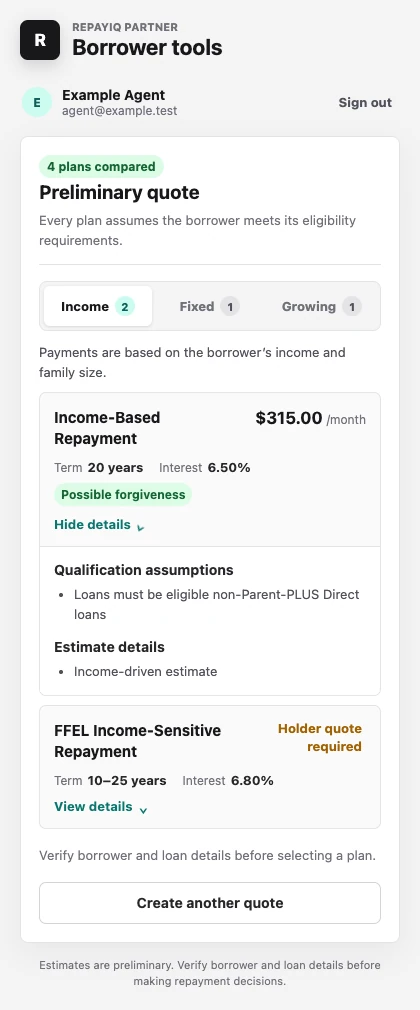
Quick quotes are available to signed-in borrowers and authorized partner teams. Estimates are preliminary and assume plan eligibility.